Posts

Showing posts with the label R12

STEP by STEP Installation of Oracle Applications Release 12

Image
This is the install process for R12 Oracle applications on LINUX. Assuming that the LINUX is ready with all the rpms and OS settings. I am doing a multiuser installation on LINUX. In order to prepare for a multi-user installation, you must first create an oracle user account and an applmgr user account. Both should be created with a default shell that is compatible with the Bourne shell. Log in as root to run Rapid Install. Then specify the oracle user as the Oracle OS user, and the applmgr user as the Apps OS user. Please complete all standard pre-reqs for LINUX install ( Like "/etc/sysctl.conf" for Shared memory and semaphors) Create Oracle user #useradd -u 1100 -g dba oraalpha #passwd oraalpha Changing password for user oraalpha. New UNIX password: BAD PASSWORD: it is based on a dictionary word Retype new UNIX password: passwd: all authentication tokens updated successfully. # #useradd -u 1101 -g dba appalpha #passwd appalpha Changing password for user app...
adadmin - R12 options

Adadmin is a Application maintainance utility. Following options are available with this utility and This is how it is used. adadmin [printdebug=y|n][localworkers= ] [flags=hidepw|trace] adadmin Non-Interactive mode [defaultsfile= ] [logfile= ][interactive=y|n] [workers= ][menu_option= ][restart=y|n] where localworkers = Used in Distributed AD. The number of workers to run on the local machine. flags = Generic flags passed to AD utilities. The available values for Adadmin are hidepw and trace. defaultsfile = The defaults file name that is located under $APPL_TOP/admin/SID/ directory. menu_option = Skips the menu in Adadmin and executes the task provided on the command line. Valid values for the menu options are listed below. Following Tasks can be achieved with adadmin. RELINK Relink Applications programs GEN_MESSAGES Generate message files GEN_FORMS Generate form files GEN_REPORTS Generate reports files...

R12 startup/shutdown scripts

In this Blog , I am explaining the shutdown/startup scripts under $INST_TOP/admin/scripts/ (Application Tier) and $ORACLE_HOME/appsutil/scripts/context_name/ These scripts are used to start and shutdown oracle applications. (All together OR individual component) adapcctl.sh:# | Start/stop/status Apache only adformsctl.sh:# | This script is used to start, stop and check the status of the forms oc4j instance. adformsctl.sh:# | This script is provided as a wrapper on top of the opmnctl script shipped adformsrvctl.sh: printf "Forms Connect Mode is set to Servlet. Please Change Forms Mode to socket and then run this script. adoacorectl.sh:# | This script is used to start, stop and check the status of the oacore oc4j instance. adoacorectl.sh:# | This script is provided as a wrapper on top of the opmnctl script shipped adoafmctl.sh:# | This script is used to start, stop and check the status of the oafm oc4j instance. adopmnctl.sh:# | This script is use...

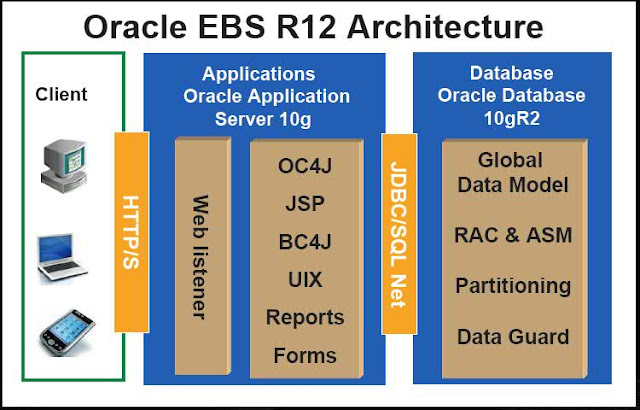
Oracle EBS R12 Architecture

Image
The Oracle Applications Architecture is a framework for multi-tiered, distributed computing that supports Oracle Applications products. In this model, various servers or services are distributed among three levels, or tiers. Technology advances for EBS R12– Certified on Oracle Fusion Middleware–Adapted the latest technology: Oracle 10gR2 Database Oracle Application Server 10g (10.1.2 for Forms & Reports, 10.1.3 for HTML & Java) OA Framework and the new user interface Oracle Containers for Java (OC4J) Oracle Personalization Extending R12 with JDeveloper10.1.3 Integration Repository XML Publisher Fully Certified on 64 bit platforms for App and DB tiers compared to 11.5.10 that requires 32 bit for App tier R12 Oracle homes : : • The 10g Release 2 (10.2) Database Server ORACLE_HOME replaces the Oracle9i ORACLE_HOME used in Release 11i. • The Application Server 10.1.2 ORACLE_HOME (sometimes referred to as the Tools, C, or Developer ORACLE_HOME) replaces the 8.0....

adpatch options in R12

adpatch help=y usage: adpatch [help=y] adpatch Pre-Install Mode [preinstall=y|n] adpatch Test Mode [apply=y|n] adpatch Non-Interactive mode [defaultsfile= ] [logfile= ][interactive=y|n][workers= ] [patchtop= ][driver= ][restart=y|n] [abandon=y|n][wait_on_failed_job=y|n] adpatch [localworkers= ][workers= ] [printdebug=y|n][parallel_index_threshold= ] [order= ] [flags= ][options= ] adpatch Upload Patch History From Filesystem [uploadph=y|n] where * help=y - Prints help information about adpatch options. * preinstall - To run adpatch in Pre-Install Mode. Default - No. * apply - To run adpatch in Test Mode. Default - Yes. * uploadph - To upload the patch history from the filesystem to the database and exit. This...

Logout R12 Oracle applications:

Logout R12 Oracle applications: • Ensure the users are trained to use the Logout or Home global buttons when completing their transactions. • Do not train them to use the browser close (“x”) link. • Logging out gracefully releases the memory and corresponding resources (i.e. connections, etc..) • Releases process resources sooner

config.txt - rapid install

Previous releases of Oracle Applications only used a text file, config.txt, to store the supplied configuration values. In Release 12, the name of this configuration file has changed, and it now includes the database SID, to give a file name of conf_ .txt (for example, conf_PROD.txt). This file stores the information collected by Rapid Install for all database and Applications nodes. Rapid Install stores copies of the conf_ .txt file in three separate locations: • Database 10g R2 /appsutil: This copy is used on database nodes, on Applications nodes in multi-node installs, and in upgrades. It is permanently stored and not deleted. • $INST_TOP: This copy is used on Applications nodes in multi-node installs, and in upgrades. It is permanently stored and not deleted. • /tmp/ : This copy is used by Rapid Install during the installation run. It is deleted when the installation is completed

adpatch - Oracle Applications r12

Image
Part 1: Basics: This post will guide you about the patching  for oracle Applications. 1. Patch File Structure Patches generally consist of a top-level directory that may contain several files, and one or more subdirectories. The top-level directory is named , where is the number of the patch. The most important files in the top-level directory are: README.txt, README.html and the unified driver file (named u.drv). 2.  Patch Formats 3. Adpatch will do the following Use AutoPatch to apply patches to the Oracle Applications file system or database. It gathers necessary information about your system through a series of prompts. When you have completed the prompts, AutoPatch performs all the tasks required to apply the patch, including the following: ■ Reads patch metadata to determine patch dependencies and requirements. ■ Uploads patch information from a prior patch session to the database (if needed). ■ Reads and validates the patch driver file and reads the p...

Autoconfig r12 , 2 new great features...

1)Running Autoconfig in parallel on multiple application nodes in Release 12 is supported right now.  2)You can run restore.sh (UNIX) or restore.cmd (Windows) to roll back an AutoConfig session.

Removing Credentials from a Cloned EBS Production Database

Metalink note [ID 419475.1] descibes the process of Removing Credentials from Cloned EBS Production Database ..A very decent process

R12 Topic 2: Oracle Applications Product Prefixes / Oracle applications Products short name list in R12

Applications Product Prefixes ABM - Activity Based Management (Obsolete) AD - Applications DBA AHL - Complex Maintenance Repair and Overhaul AHM - Hosting Manager(Obsolete) AK - Common Modules-AK ALR - Alert AME - Approvals Management AMF - Fulfillment Services (Obsolete) AMS - Marketing AMV - Marketing Encyclopedia System AMW - Internal Controls Manager AN - Sales Analysis AP - Payables AR - Receivables AS - Sales Foundation ASF - Sales Online ASG - CRM Gateway for Mobile Devices ASL - Sales Offline ASN - Sales ASO - Order Capture ASP - Oracle Sales for Handhelds AST - TeleSales AU - Application Utilities AX - Global Accounting Engine AZ - Application Implementation BEN - Advanced Benefits BIC - Customer Intelligence (obsolete) BIE - eCommerce Intelligence BIL - Sales Intelligence BIM - Marketing Intelligence BIN - Communications Intelligence BIS - Applications BIS BIV - Service Intelligence BIX - Interaction Center Intelligence BIY - Systems Intelligence BLC - Utility Billing BNE - W...

R12 new features : Topic 1

New features R12 Topic 1 Case Sensitivity in Oracle Applications User Passwords In previous releases of Oracle Applications, user passwords were treated as case insensitive. Now, Oracle Applications user passwords can optionally be treated as case sensitive, depending on the mode you choose. Case-sensitivity in passwords is controlled by the site-level profile option Signon Password Case. This profile has two possible settings: • Sensitive - Passwords are stored and compared as they are, with the password case • Insensitive (or unset) - Passwords are treated as case insensitive. In Insensitive mode, passwords are stored and compared in uppercase, similar to that in earlier releases. The entered password and the decrypted password are converted to uppercase prior to comparison.

r12 upgrade path

Prepare the DB home for R12 upgrade: Oracle 10gR2 Database Preparation Guidelines for Oracle E-Business Suite Release 12 Upgrade (Doc ID: 403339.1). Upgrade Path for Systems with 11.5.9 CU2 or 11.5.10.2 with a 10.2.0.3 Database Path E is applicable for E-Business Suite systems already on either 11.5.9 CU2 or 11.5.10.2 and currently running 10.2.0.3 of the database. Systems in this category have databases not yet upgraded to 10.2.0.4, and whose administrators plan to continue using version 10.2.0.3 after upgrading to Release 12.0.4. While this is supported, Oracle recommends that users upgrade the database to the latest patch set of Oracle Database 10g Release 2 available (currently 10.2.0.4). Path E follows the R12 upgrade path as documented in the Oracle Applications Upgrade Guide: Release 11i to Release 12.0.4. During the Migrate database to Oracle10g Release 2 step in Chapter 3, apply database patches to the existing 10.2.0.3 Oracle home and perform all tasks documented in the...

R12 GSS hangs

GSS for ALL got struck. ( Reason: Gather Schema Statistics concurrent program hung on an external tables. GSS can't collect stats on external tables) SOL: This problem is a known bug and Oracle has given patch 5876047( This patch modifies FND_STATS package to exclude gathering statistics on external tables) for it. Gather Schema Stats Failed With Ora-1 Errors After Applying Patch 5876047 Note:470556.1: Take a backup of the FND_STATS_HIST table Truncate table FND_STATS_HIST Re-submit Gather Schema Statistics program. You do NOT need to truncate this table after each run of Gather Schema Statistics. Doing it once will be enough, because each run of GSS will use a new request_id